New features and resources that help make the business case to switch to Chrome Enterprise
This blog post uncovers the 3 primary reasons businesses are switching to Chrome Enterprise. For more information, contact Silibrain LLC today.
Why are IT teams considering Chrome Enterprise now?
IT teams are under pressure to support remote and hybrid work, reduce on‑premise infrastructure, and keep employees secure and productive. Chrome Enterprise fits well into this shift because it’s built around cloud-first management and security.
A recent Forrester study found that 85% of enterprises either have a cloud-first strategy or are prioritizing cloud for specific use cases. As organizations move call centers, government services, and other critical operations to remote models, they need devices and management tools that can be deployed and supported without physical access to the user, device, or network.
Chrome Enterprise helps IT teams:
- Support remote workers with cloud-managed devices and policies
- Lower reliance on high-maintenance, legacy infrastructure
- Maintain strong security with frequent, automatic OS updates
Examples include a financial services call center moving to work-from-home and a local government migrating 4,000 employees to remote-ready solutions. In both cases, Chrome Enterprise plays a role in keeping services running while IT reimagines how work gets done.
How does Chrome Enterprise improve device lifecycle efficiency?
Chrome Enterprise is designed to streamline the entire device lifecycle, not just reduce hardware costs. IT teams see time savings at three key stages: deployment, redeployment, and deprovisioning.
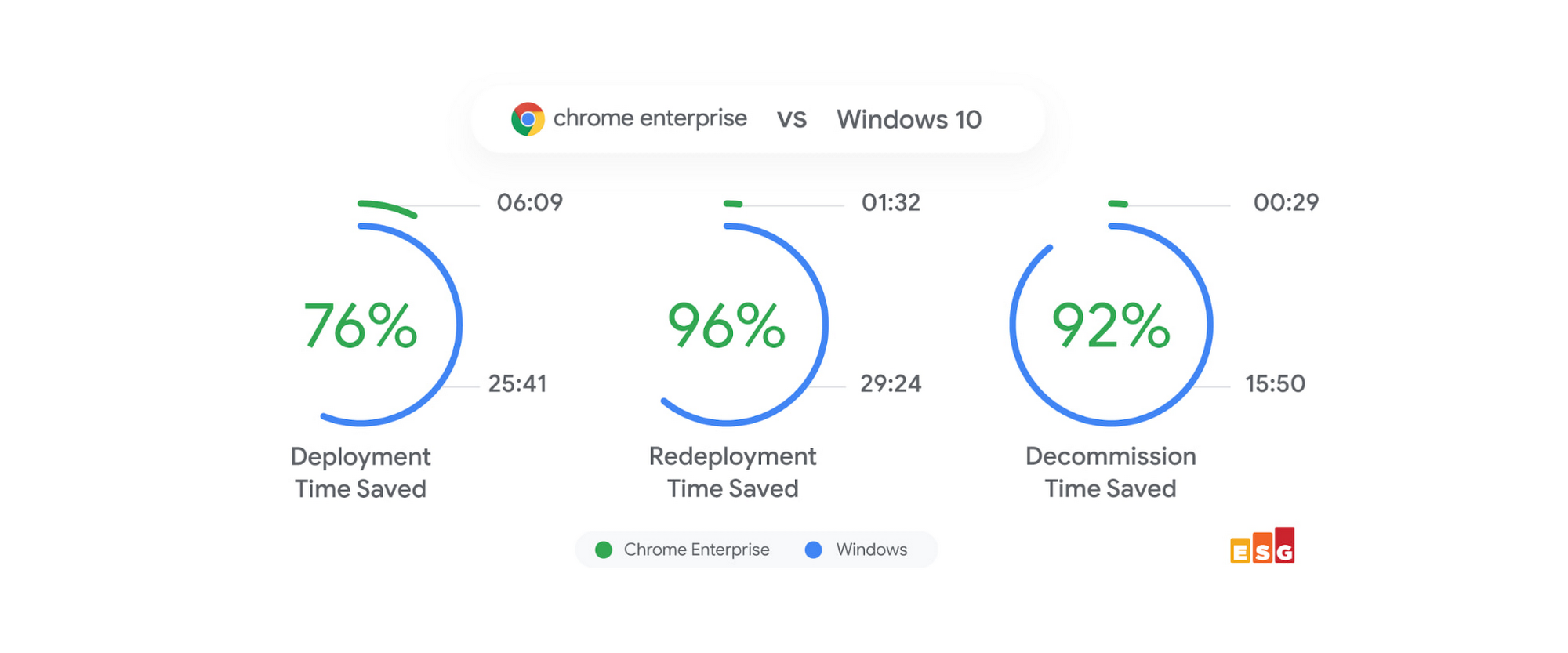
In a lab study by Enterprise Strategy Group (ESG), Chromebooks were compared with traditional PCs. ESG measured the steps and time required for each lifecycle phase and found that Chromebooks delivered:
- 76% time savings during initial device deployment
- 96% time savings when redeploying devices to new users
- 92% time savings during device deprovisioning
These gains come from cloud-based management and configuration. Devices can be enrolled, configured, and reassigned with centrally managed policies, rather than manual, device-by-device setup.
For IT, this means:
- Faster onboarding for new hires and contractors
- Quicker turnaround when devices change hands
- Simplified end-of-life processes with less hands-on work
Over time, these efficiencies help IT teams reallocate effort from routine device work to higher-value projects.
Can Chrome Enterprise support legacy and full-featured applications?
Many organizations are moving toward cloud-based apps but still depend on certain full-featured or proprietary legacy applications. Chrome Enterprise addresses this with a solution that lets you run those applications alongside modern web and Android apps.
Through a partnership with Parallels Desktop for Chromebook Enterprise, IT teams can:
- Run full-featured and legacy applications locally on Chrome devices, within a Chrome OS user session
- Provide access even when there is no internet connection
- Limit availability to devices enrolled with Chrome Enterprise Upgrade, giving IT centralized control
Parallels Desktop for Chromebook Enterprise is designed for business users and is available through select Chrome device manufacturers and reseller partners. This approach helps organizations:
- Maintain access to critical legacy tools while they transition to cloud alternatives
- Standardize on Chrome OS devices without losing key desktop capabilities
- Reimagine their application strategy at a manageable pace, rather than all at once
Combined with Chrome OS updates every six weeks—which add new security and user experience features—this gives IT a path to modernize while still supporting existing workflows.
New features and resources that help make the business case to switch to Chrome Enterprise
published by Silibrain LLC
Adapting technology to real-world needs, to better life, solve problems, and move progress forward.




 Sign in with LinkedIn